Which scraping extension is best for Gulf competitor prices?
Browser extensions a Gulf merchant can use to follow competitor prices, compared: scrapers for a one-off price list, and what to use to know when a price moves.
In this article
- What the job needs
- Scrapers give you a price list, once
- Page monitors check a few pages for you
- Price trackers made for shoppers
- Why Gulf shops are harder for a general tool
- Gulf Pricing: made for monitoring Gulf retailers
- How they compare
- Which to use
- Before you scrape a retailer’s site
- How to start
- Frequently asked questions
If you sell the same air fryer as three other shops, you probably know the routine: a couple of times a week, you open their product pages in a row of tabs, copy the prices into a sheet and compare them with last week’s figures. That works well enough when you have a handful of products, but as the list grows, going through those pages yourself becomes a job, and that’s usually when you start looking for a browser extension to take some of it off your hands.
You’ll find dozens on the Chrome Web Store, most of them calling themselves web scrapers, but there’s a difference between getting a list of prices from a competitor’s website and knowing when one of those prices moves. A scraper gives you the list when you ask for it. If you want something that keeps going back to check the same products and tells you when a price changes, you’re looking at a different kind of extension.
We should say up front that we make one of these extensions ourselves. For this article, we went through the tools a Gulf merchant is most likely to come across, and every price and limit below comes from the tool’s own pricing page and its Chrome Web Store listing as they stood on 15 November 2026.
What the job needs
Getting a price into a sheet once is the easy part. The work starts when you have to return to the same products at the same shops every week, because among all those prices, it’s usually only a few that have moved.
A tool that takes this work off your hands needs to revisit each product on a schedule, even when your computer is switched off, and keep the previous reading so there’s something to compare against. It also needs to tell you which prices have changed, rather than hand you another table to read through. And it has to get the price right in the first place, which in the Gulf means reading the correct country’s store and keeping the price in that store’s currency.
Scrapers give you a price list, once
A scraper takes the page you’re looking at and turns its contents into rows in a file. You open a competitor’s category or search page, show the extension which part contains the product name and which contains the price, and it gives you a CSV or Excel sheet. If all you need is a list of every air fryer price a competitor has today, this is the right tool for the job, and you can do it without paying anything.
Web Scraper (opens in a new tab) has 800,000 users on the Chrome Web Store, and its extension is free and runs in your own browser. Getting it set up takes some work, though, because you first have to build what it calls a sitemap, which tells the extension which links to follow and what to read on each page. A wizard can now draft one for a page of listings, though its own listing still acknowledges that scraping can be difficult at first and points users towards its tutorials.
Data Miner (opens in a new tab) makes that part easier with recipes, which are extraction rules written by other users for particular websites. On a well-known site, you may be able to use one without building anything yourself. The free plan covers 500 pages a month, but there’s an important detail in the footnote on its pricing page: go over that allowance and your account is locked until you move to a paid plan, which starts at 19.99 USD a month.
Simplescraper (opens in a new tab) and Thunderbit (opens in a new tab) try to work out the columns for you. Simplescraper lets you run up to 5 pages at a time for free and doesn’t even require an account, with 100 credits for longer runs once you sign up, while Thunderbit’s free plan gives you 6 pages a month.
Instant Data Scraper also appears in nearly every list of extensions like these, but there’s something worth checking before you install it. Web Robots, the company that built it, says on its own page (opens in a new tab) that it no longer owns, develops or supports the extension. We followed the link on that page to the Chrome Web Store on 15 November, and no listing opened for us.
Some scrapers can repeat a job on a schedule, which brings them closer to monitoring, although there’s still a difference between running another scrape and knowing what changed. Thunderbit’s paid plans start at 9 USD a month billed yearly and include up to five scheduled scrapers. Its pricing table also lists one scheduled scraper on the free plan, running once a day at most, within that plan’s 6 pages a month. Web Scraper puts scheduling in a separate Cloud service with plans from 50 USD a month. Simplescraper goes further on its paid plans, which start at 39 USD a month: as well as scheduling, they include change monitoring, which alerts you when a page or a part of it changes. With a scheduled scrape alone, you still get a table of what the page showed, so before paying, check whether the tool identifies the rows that have changed or expects you to compare today’s results with yesterday’s yourself.
Page monitors check a few pages for you
A page monitor comes closer to what most merchants have in mind when they want to keep an eye on competitor prices. You open a product page, select the part showing the price, and the tool checks that same spot on a timer, sending you an email when it changes. Because it works on ordinary web pages rather than a fixed list of retailers, you can use it on a small independent shop just as easily as on a large retailer’s website.
Distill Web Monitor (opens in a new tab) has 400,000 users and a free plan covering 25 pages, although where those checks happen makes a difference. Only 5 of those pages can be checked from Distill’s servers, at most every 6 hours. The rest are checked from your own browser, so it has to be open. There’s also a limit of 30 emails a month on the free plan, with paid plans starting at 15 USD a month.
Visualping (opens in a new tab) has a 4.5 rating on the store from more than 7,000 ratings. Its free account gives you 5 pages and 150 checks a month from its servers, which works out at about one check a day for each page. The extension can check additional pages directly from your browser while it’s open, and paid plans start at 14 USD a month for 10 pages.
For a few pages, either service does the job, and you can start without paying. As a way to keep up with competitor prices, the limitations show as the list grows: you have to set up each product page yourself for each country’s store, and neither tool knows what you’re charging for the same product. A few hundred products is also well past either free allowance.
Price trackers made for shoppers
There’s another category worth knowing about: extensions that put a price history chart directly on the product pages of the shops they support. They’re designed for shoppers who want to decide when to buy, but merchants can use them to see what a competitor has charged for a product in the past.
Keepa (opens in a new tab) is the best known, with five million users, although it only works on Amazon, and amazon.sa and amazon.ae aren’t among the ten Amazon sites named in its listing. Amazon.ae Price Tracker (opens in a new tab) from AiPrice covers Amazon’s UAE and Saudi sites, with price history and alerts when a price drops. DeserTracker (opens in a new tab) offers the same kind of service for noon, IKEA and other shops in the UAE, at no charge. Both extensions say in their listings that they use affiliate links.
Why Gulf shops are harder for a general tool
To see what a scraper would actually be reading, we ran a search on each of the Saudi stores of Namshi, noon, eXtra, Jarir and Amazon.
On Namshi and noon, a price appears as a bare number such as 69 or 419, with the riyal drawn as a symbol beside it rather than written into the page text. The letters SAR don’t appear anywhere, which means the number that lands in your sheet has no currency attached to it. eXtra prints “449 Incl. VAT”, Jarir prints “SR 599”, and Amazon does include SAR, but a single result can show three different prices: the current one, a “List” price and a lower price from other sellers’ offers. You’ll need to make sure the scraper has picked the right one.
This becomes more complicated when you consider that the same retailer can have stores in several countries. Namshi’s footer lists six Gulf countries and Jarir’s menu lists five, each with its own store and currency. Every store also comes in Arabic and English, so the same product can have several addresses and two names. A general scraper reads whichever page your browser happens to be on, leaving you to keep the Saudi results separate from the UAE ones and make sure you’re comparing like with like.
There’s also a difference between reading a page in your browser and asking a tool’s servers to fetch it for you. An extension running in your browser sees the page much as you do, but a scheduled check from the tool’s servers has to reach the retailer from outside, and that can cause problems. When we requested Namshi’s and noon’s search pages without a browser, both closed the connection. Jarir responded, but returned “0 results” until its scripts had run in a browser, where the same search showed about 190 results. The scheduling tools say they can handle websites like these, but we haven’t tested them on these particular shops, so try them against your own competitors’ pages before paying for a plan.
Gulf Pricing: made for monitoring Gulf retailers
This is the job our extension was built for: putting products into ongoing monitoring. It works in Chrome and adds a Monitor tag to product pages and search results on the shops we read, so you can add products in three ways:
- On a product page, press Monitor on the tag in the corner.
- On a search, press Select products, tick the ones you want, then press Monitor.
- From the toolbar, open the extension, then press Monitor this product.
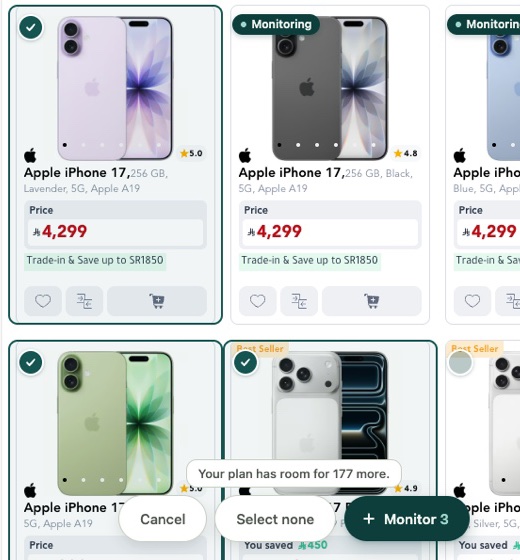
Once you’ve added the products, they go straight into your Gulf Pricing account, where we take care of the reading. We check each price again according to your plan’s schedule, from once a day to every 6 hours, whether your browser is open or not. We also keep each change alongside the price before it, the price after it and the minute it was read, so you can go back through a product’s history whenever you need to. On the dashboard, once you’ve added your own prices, you’ll see each competitor’s price and stock next to yours, with the gap between the two, and when a price drops, we send you an email either as it happens or in a daily digest, depending on your plan.
The extension works with the retailers listed on our coverage page: nine retailers across six Gulf countries, namely Nahdi, Jarir, eXtra, Namshi, Centrepoint, Home Centre, Babyshop, Max Fashion and Splash. It isn’t designed to scrape any website you choose, and that narrower coverage is what allows us to handle the details of Gulf retail properly. We know which country’s store a product belongs to, and each price stays in the currency charged by that shop rather than being converted. For example, on 15 November our pricing page showed one Home Centre drying stand at 29.00 AED in the UAE and 39.00 SAR in Saudi Arabia, with the two monitored as separate listings.
In your browser, the extension reads supported shop pages to find the products listed there. It sends your Gulf Pricing account the links of the products you choose to monitor, and never the addresses of other pages you visit.
The extension is free with your Gulf Pricing account, and you get your first 14 days of monitoring free as well. That covers up to 300 products checked every 12 hours, without asking you to enter card details. After the trial, plans start at 29 USD a month for 100 products checked once a day.
How they compare
| Extension | What it’s for | Checks again by itself | Free | Paid plans from |
|---|---|---|---|---|
| Gulf Pricing | Monitoring competitor prices at nine Gulf retailers | Yes, once a day to every 6 hours | 14-day trial, up to 300 products | 29 USD a month |
| Distill Web Monitor | An alert when a page you chose changes | Yes. On the free plan, mostly while your browser is open | 25 pages | 15 USD a month |
| Visualping | An alert when a page you chose changes | Yes | 5 pages, 150 checks a month | 14 USD a month |
| Thunderbit | Scraping a page into a sheet | On paid plans. Its pricing table also lists one scheduled scraper on the free plan | 6 pages a month | 9 USD a month, billed yearly |
| Simplescraper | Scraping a page into a sheet | On paid plans, with change monitoring | Runs of up to 5 pages | 39 USD a month |
| Web Scraper | Scraping a page into a sheet | With its paid Cloud service | The extension | 50 USD a month for its Cloud service |
| Data Miner | Scraping a page into a sheet | Not listed on its pricing page | 500 pages a month | 19.99 USD a month |
Which to use
If your competitors are among those nine retailers and you want to know when their prices move, Gulf Pricing is the tool for that job. It was built around those shops, checks prices with your browser closed, keeps a history of changes and puts each competitor’s price next to yours, without converting currencies.
If you need a competitor’s entire category in a spreadsheet today, a scraper is the better choice. That’s what these extensions are designed to do, and a one-off export isn’t something ours offers. Web Scraper is a good option if you’re comfortable learning how to build a sitemap, while Data Miner and Simplescraper are easier places to start if you’d rather avoid that setup. Web Scraper and Data Miner let you do the job for free at that size, and Simplescraper does for runs of up to 5 pages.
If what you want to follow is something other than a price, such as a competitor’s delivery terms or a sale banner, Distill or Visualping makes more sense. They work on any page of any website. You add each page yourself, and the free plans cover 25 pages on Distill and 5 on Visualping.
If you’re interested in price history on Amazon’s Saudi or UAE site, try the AiPrice tracker. For shops in the UAE, try DeserTracker.
Before you scrape a retailer’s site
Before collecting prices from a shop, read its terms of use. Amazon.sa’s conditions of use (opens in a new tab), for example, say that the licence to use the site doesn’t include collecting product listings or prices, or using data-gathering tools. What that means in practice depends on what you’re collecting, what you intend to do with it and the law where you operate. Nothing in this article is legal advice.
There are practical considerations as well. A scraping extension works through your own browser and internet connection, so loading a few hundred pages within a few minutes may cause a shop to show you a captcha or stop responding for a while. The scraper also relies on the layout of the page staying the same. If a retailer changes its website, the rules you set up may continue running but return an empty or incorrect price column without warning. Check the exported file before using the figures.
How to start
Start with the coverage page and check whether your competitors are listed. If they are, it takes three steps.
-
1 Add it to Chrome
Install it from the store, then press Connect in the tab it opens.
-
2 Connect your business
Sign in and pick which of your businesses the products go to.
-
3 Monitor from the shop
Open a product or a search on a supported shop and press Monitor.
Free with your Gulf Pricing account. Your first 14 days are free, with no card to enter.
Frequently asked questions
What is the difference between a web scraper and a price monitoring extension?
A web scraper turns the page you’re looking at into a CSV or Excel sheet when you ask for it, so you get a price list once. A price monitoring extension saves the products you choose, and the service behind it checks them again on a schedule and tells you when a price changes.
Can a scraper extension monitor prices on Namshi or Jarir?
It can read the page you have open, although on Namshi the price is a bare number with no currency in the text. Checking again on a schedule from a tool’s own servers is harder. When we requested Namshi’s search page without a browser, it closed the connection, and Jarir’s page said “0 results” until its scripts had run in a browser. The scheduling tools say they can handle websites like these, but we haven’t tested them on these shops.
Does Keepa work on amazon.sa or amazon.ae?
Keepa’s listing names ten Amazon sites, and amazon.sa and amazon.ae aren’t among them. Amazon.ae Price Tracker from AiPrice covers Amazon’s UAE and Saudi sites, with price history and alerts when a price drops.
How does Gulf Pricing handle different Gulf currencies?
Each price stays in the currency the shop charges in and is never converted. When a retailer sells the same product in two countries, such as a Home Centre drying stand priced in AED in the UAE and in SAR in Saudi Arabia, the two are monitored as separate listings.